
Two lightweight Windows VST3 plug-ins for sending and receiving VBAN audio.
TX sends one mono or stereo stream while host audio passes through unchanged. RX receives one matching stream and plays it in your audio host. Separate plug-ins, simple network settings, horizontal L/R meters, and live packet counters.
Download v0.1.1 · Installation guide · Report an issue
Free and open source under AGPL-3.0. Donations support development and are optional.
VBAN Plug is made by ElkaSoft. The VBAN protocol and Voicemeeter are by VB-Audio.
Download and install
Version 0.1.1 is the initial public MVP test release for Windows 10/11 x64. Use a 64-bit host that supports VST3.
| Download | Contents |
|---|---|
| Windows installer | Dark ElkaSoft installer for both TX and RX, with an optional Donate button. |
| Portable ZIP | Both complete VST3 bundles, instructions, licences, and artwork in one VBAN Plug folder. |
| SHA256 checksums | Checksums for the installer and both ZIPs. |
Close your audio host, run the installer, and then rescan VST3 plug-ins in the host. Both plug-ins go to:
C:\Program Files\Common Files\VST3
For manual installation, extract the portable ZIP and copy the entire
VBAN Plug TX.vst3 and VBAN Plug RX.vst3 folders there. Keep their
Contents, Resources, moduleinfo.json, and x86_64-win files together.
Use one installation method and keep one copy of each plug-in.
The builds are unsigned. No separate Microsoft Visual C++ runtime download is needed. See the installation guide for updates and removal.
Editors
| Transmit | Receive |
|---|---|
 View full size ↗ View full size ↗ |
 View full size ↗ View full size ↗ |
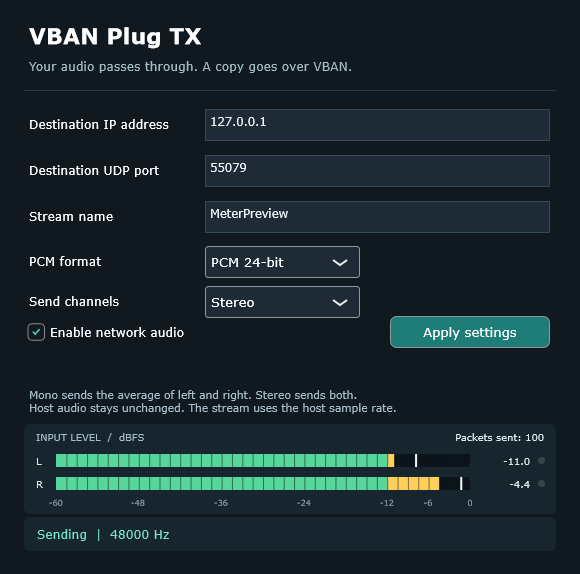
TX settings
| Setting | Meaning |
|---|---|
| Destination IP address | IPv4 address of the receiving computer. |
| Destination UDP port | Port listened to by the receiver; default 6980. |
| Stream name | Exact case-sensitive name, 1–16 printable ASCII characters. |
| PCM format | 16-bit or 24-bit signed PCM. |
| Send channels | Stereo or mono. Mono averages left and right; a mono host input is duplicated when sending stereo. |
Enter the settings and enable network audio. Changes to text/drop-down fields are activated with Apply settings. New instances start disabled.
The network copy is quantized/clipped to the selected PCM format; host audio is never modified by TX. Packet encoding and UDP socket operations happen on the network worker. Queue overload drops network packets without blocking the host audio callback.
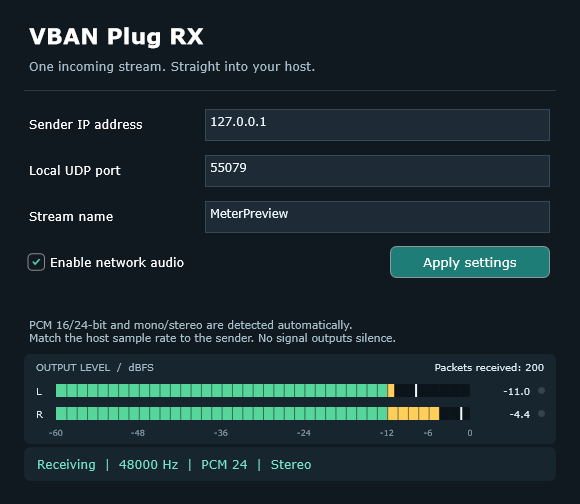
RX settings
| Setting | Meaning |
|---|---|
| Sender IP address | Only packets from this exact source IPv4 are accepted. |
| Local UDP port | The port this plug-in listens on. |
| Stream name | Must match the sender exactly. |
PCM 16/24-bit and mono/stereo are detected automatically. Incoming mono plays on both stereo outputs. Incoming stereo is averaged if the host uses a mono output.
RX and the sending system must use the same nominal sample rate, for example 48000 Hz. The editor reports a mismatch and outputs silence until corrected. A small adaptive receive buffer follows clock drift using fractional interpolation; this version does not convert between different nominal sample rates. Typical buffering is about 20 ms or two host blocks, whichever is larger, plus network scheduling. RX is a live source and does not request host delay compensation.
No matching signal, a disabled RX, or a sample-rate mismatch produces silence. Packet gaps/reordering and overflows cause recovery/rebuffering, rather than indefinite stale playback. Allow roughly half a second for a freshly restarted external sender to be recognised if its packet counter restarts.
Each active RX needs a free local UDP port. Two RX instances cannot share the same port, and RX cannot bind a port already occupied by VoiceMeeter or another receiver. Use different ports for separate receivers.
The source address is the remote computer's IP, not the local bind address. RX listens on local interfaces and filters the sender. IPv4 unicast is supported; multicast, broadcast destinations, hostnames, compressed audio and more than two channels are outside this version.
Settings are saved in the host project. TX passes audio through when bypassed; RX bypass outputs silence. Network audio is paused for offline processing, so record RX audio in real time before offline exporting. The host must keep processing the insert to transmit/receive, including when transport is stopped. If packets do not arrive from another PC, check the host application's Windows Firewall permission for the chosen UDP port.
Levels and packet counters
Both editors have horizontal L/R meters refreshed at 60 Hz. Bars show a 50 ms RMS envelope in dBFS; white markers retain brief peaks for 750 ms, and red clip lights stay visible for one second. The meters fall smoothly and return to silence when audio processing stops.
TX measures host input before mono conversion or PCM quantization, including while network transmission is disabled. RX measures the decoded audio actually output to the host. Incoming mono is shown on both channels.
The meter header always displays Packets sent in TX or Packets received in RX, refreshed at 10 Hz. RX counts accepted matching-stream packets, not unrelated UDP traffic. Totals remain visible when a stream stops and reset when network settings are applied. A rising received count with silent meters can help identify a silent source or a sample-rate mismatch.
Metering reads audio without changing it and publishes levels through lock-free atomics.
Local test
- Load RX on a stereo track. Set sender IP to
127.0.0.1, local port6980, and stream nameVBAN. Enable it. - Load TX on another track containing audio. Set the same IP, destination port and stream name. Choose PCM and channels, then enable it.
- Use the same host sample rate. RX's status should show the detected format.
- Avoid routing the RX output back into TX.
Support and credits
Found a problem or have an idea? Use GitHub Issues. For bugs, include the plug-in version, audio host/version, sample rate, block size, TX/RX settings, and what the packet counters show.
If VBAN Plug is useful to you and you would like to support continued development, you can donate on Ko-fi, or use the Donate button in the installer. Donations are completely optional—thank you for supporting ElkaSoft.
Useful links:
- VBAN protocol and tools
- Voicemeeter
- JUCE framework
- Steinberg VST3 documentation
- OBS VBAN Audio by ElkaSoft
VBAN Plug is an independent ElkaSoft project, not an official VB-Audio or Steinberg product. ElkaSoft created this plug-in; VB-Audio created the VBAN protocol and Voicemeeter. No Voicemeeter Remote DLL is required or bundled.
Copyright © 2026 ElkaSoft. Licensed under GNU AGPL v3; see LICENSE. Third-party code and artwork retain their respective notices; see NOTICE.md.
For source code, build instructions, and development documentation, visit the project on GitHub.