
← Audio

Audio / Audio pad sampler

EchoPad

Capture the last 15 seconds, trigger sound clips across 16 pads, and connect your setup with MIDI, local audio, and VBAN.

Windows x64Audio pad sampler
EchoPad: a 16-pad audio icon above bright cyan, magenta, violet, amber and lime digital waves.

Choose your build

WindowsStablev1.0.0.0.latestSigning not specified
WindowsDev buildv1.1.0-dev.20260929.3Unsigned
Stable, Dev & signing explained
Need a hand?

Get help with your setup or report a problem.

Choose your build

EchoPad turns a 16-pad grid into a compact soundboard for live capture, clips, streaming, and MIDI controllers.

Use the separate Stable and Dev build downloads above. The latest development build adds the new settings tabs, pad artwork, saved-data migration, and in-app installer downloads described in this guide. The older stable release has a different interface and may not include those features. Check the version and signing information beside each download; the current development build is unsigned.

Download and install

Choose the Windows installer for a normal installation. The current development installer defaults to C:\Program Files\ElkaSoft\EchoPad and includes its .NET runtime.

A self-contained ZIP is also available on the GitHub release page. Extract the entire ZIP before running Echopad.App.exe. This ZIP uses the normal EchoPad data folder; it is not an isolated portable profile. The graphics ZIP contains promotional images, not the application.

Back up your saved data and audio before testing a development build. Windows may show an unknown-publisher warning for an unsigned installer.

Meet your pads
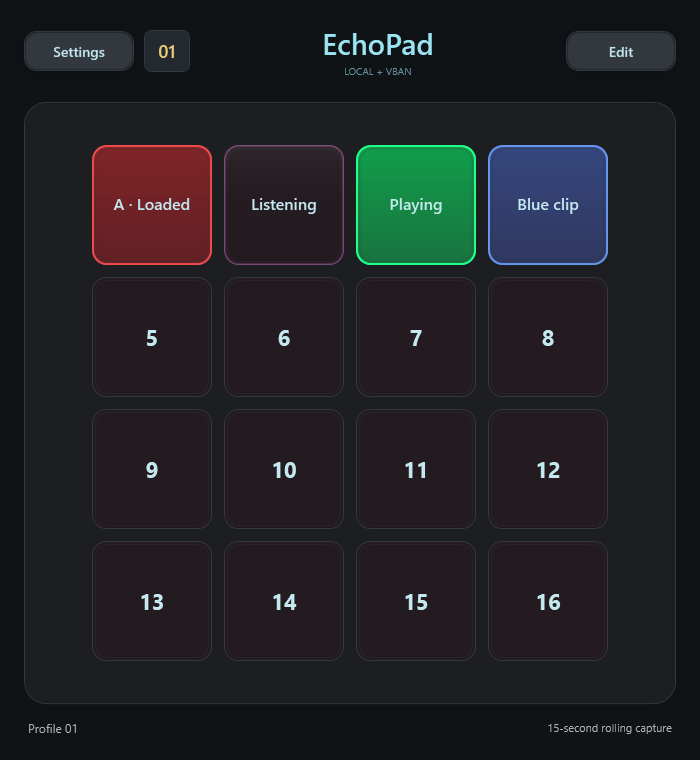
EchoPad 16-pad grid showing empty, listening, loaded and playing states.View full size ↗
Published EchoPad interface example using test pad states.

Load a sound clip or capture the last 15 seconds from either input. Trigger pads with the mouse, keyboard, or MIDI. Colours distinguish empty, armed/listening, loaded, and playing pads.

Turn on Edit, then right-click a pad to open its settings. Use Browse to choose an audio file, enable Echo to capture an input, or choose Drop folder to receive files from a watched folder. An empty armed Echo pad captures the rolling buffer when triggered; its next trigger plays the saved clip.

Trim the start and end, adjust gain, and use Save pad to keep your changes. Turn Edit off when you are ready to perform.

Route your audio
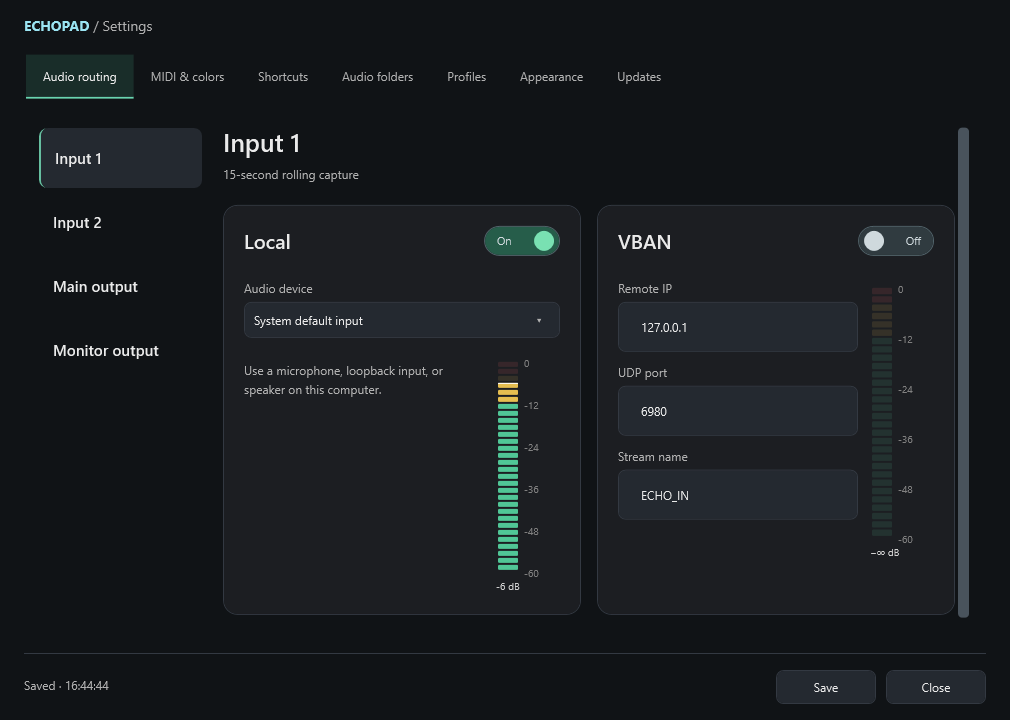
EchoPad Audio routing settings with Local and VBAN input cards.View full size ↗
Published development interface render; device details and meter levels are simulated.

Open Settings → Audio routing and select Input 1, Input 2, Main output, or Monitor output. Choose the Local or VBAN card for that route. Each route uses one transport at a time, and local and network routes can be mixed.

For local audio, select the device you want to use. For VBAN input, match the sender's address, port, and stream name. VBAN needs a compatible sender or receiver elsewhere in your setup.

Main output carries normal playback. Monitor output provides private previews and pads configured for monitoring in Edit mode. Check your mixer routing so private previews stay out of the audience mix.

Make it your own
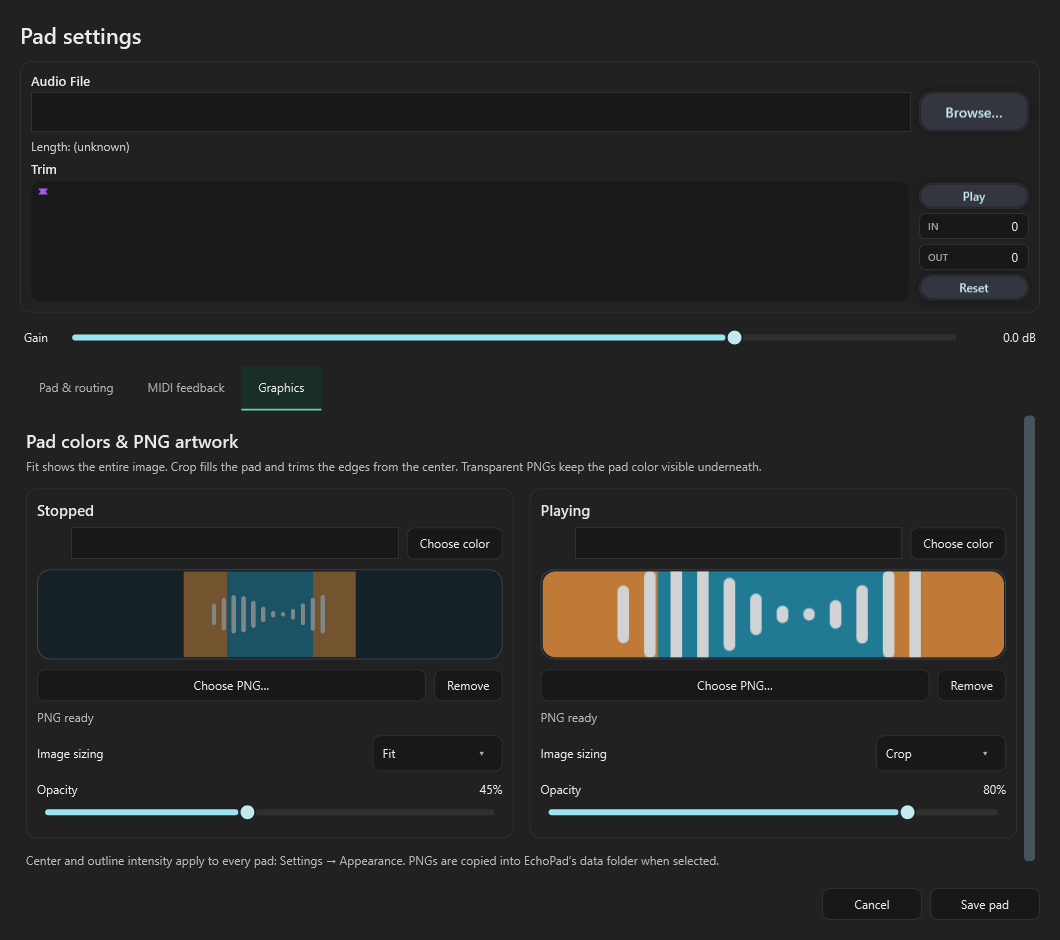
EchoPad pad editor with separate stopped and playing PNG controls.View full size ↗
Published development interface example showing Fit, Crop and opacity controls.

In a pad's Graphics tab, choose separate PNG images for stopped and playing states. Fit shows the full image; Crop fills the pad from the centre. Each state has its own opacity control, and EchoPad keeps a copy of imported PNGs.

Use Settings → Appearance to adjust colours and the strength of loaded-pad fill, playing-pad fill, and outlines. Pad names and state outlines stay visible over the artwork.

Profiles, keyboard and MIDI

Use the 16 profile slots to keep different pad arrangements. Settings → Profiles lets you name and find profiles and configure their switching controls.

Select MIDI ports under MIDI & colors, then use Learn to assign triggers and controller feedback. Keyboard shortcuts support modifier combinations and operate while EchoPad is active.

In Edit mode, hold Ctrl and click a source pad, then click target pads to copy its clip, trim, gain, colours, and artwork. The targets keep their own routing and triggers. Release Ctrl or press Escape to finish.

Updates and saved data

In the current development version, open Settings → Updates and choose Check for updates. When a supported update is available, Download and install verifies the download, saves your settings, and starts the installer. Checking alone does not install an update. Older builds require one manual installation to gain this flow.

Settings, profiles, imported pad images, and new captures are stored in %LOCALAPPDATA%\ElkaSoft\EchoPad. First launch copies older EchoPad saves and media while preserving the originals and existing destination settings.

Back up that complete folder together with any audio kept elsewhere. External libraries and watched folders remain in their original locations. Moving to another computer may require selecting those files again.

Need a hand?

Use the Discord or GitHub links on this page. Include your EchoPad version, whether you use local audio or VBAN, and the steps that reproduce the problem.

For source code, build instructions, and development documentation, visit the project on GitHub.

Release notes

Windows Stable v1.0.0.0.latest2026-02-26
Windows Dev build v1.1.0-dev.20260929.32026-09-29

Version: 1.1.0-dev.20260929.3 · Windows x64 · Prerelease

Changes

  • New General settings tab with independent Start with Windows, Open to tray, Close to tray and Minimize to tray switches. All default off.
  • Tray menu with Open EchoPad, Settings and Exit EchoPad; double-click restores the window. Repeated manual launches open the existing instance.
  • Hidden startup initializes audio, MIDI and rolling capture. Hiding the window no longer tears down those services. Actual exit waits for pending capture saves, without waiting for playing clips to finish. Updates and Windows shutdown bypass close-to-tray.
  • Startup is registered for the current Windows user, with a quoted executable path that refreshes after relocation. Turning the option off removes the entry; uninstall removes a matching entry for the uninstalling user.
  • Dark installer follows Throttle, VBAN Stream and VBAN Plug: larger modern wizard, EchoPad portrait waveform artwork, ElkaSoft logo and updated welcome/finish text. Existing application appearance controls remain unchanged.
  • Updated settings illustrations include the General tab. Tray construction preserves the host's async context.

Also included from the preceding development builds:

  • Installer now defaults to C:\Program Files\ElkaSoft\EchoPad, including upgrades from the old installation folder.
  • Writable data now lives in %LOCALAPPDATA%\ElkaSoft\EchoPad. First launch copies older settings, profiles, pad images and captures, rewrites imported media references, and keeps originals. Existing destination settings win; conflicting media are retained under distinct names. Failed migrations report an error and can be retried.
  • Matching portrait/landscape waveform graphics retain the pad-icon design, with a 373,410-byte horizontal preview. Artwork ships in the repository and application packages.
  • The installer preserves old custom install locations for data discovery. The application migrates as the Windows user who launches it.
  • Settings can now download the matching installer, show progress/cancellation, verify its SHA-256 and size, save settings and wait for pending captures, launch the installer and close EchoPad. Failed downloads, canceled Windows prompts and failed launches keep the app open. Older builds need one manual installation to gain this workflow.

The following interface changes from the previous development build are also included:

  • Eight settings tabs: General, Audio routing, MIDI & colors, Shortcuts, Audio folders, Profiles, Appearance and Updates.
  • Local/VBAN cards with on/off controls and separate vertical input meters.
  • Clearer whole-pad loaded and playing colors, brighter rings and centered names.
  • Rounded global sliders for loaded fill, playing fill and outline strength, plus hue wheels and palette pickers.
  • Profile names/search, dark Shift-click selection, and profile configuration inside Settings.
  • Readable Ctrl/Shift/Alt hotkeys, corrected CC threshold/release behavior and restored trim bindings.
  • Ctrl-click copy to multiple pads, with selection cleared when Ctrl is released or the gesture is canceled.
  • Pad editor tabs for routing/triggers, MIDI LED feedback and graphics; waveform/trim/gain remain above them.
  • Separate stopped/playing PNGs, opacity, Fit and centered Crop. Imported PNGs are retained in the EchoPad data folder.
  • Manual GitHub update checks with an orange available-update button, release name/version and a browser link.
  • Waveform loading now reads WPF dimensions on the UI thread and ignores obsolete asynchronous results.
  • Updated illustrated documentation with actual WPF menu renders.

The normal 15-second capture and playback workflow remains in place. VST endpoint support is not included.

Downloads and signing

The self-contained Windows x64 ZIP includes the runtime, illustrated guide and promotional graphics. Extract the whole ZIP before launching Echopad.App.exe. The installer installs the same application payload. SHA-256 checksums accompany the assets. The installer is compiled, migration uses isolated fixtures, and launcher success/cancellation is simulated; a real installation over personal saved data is not part of the automated checks.

This is an unsigned development build. Code signing will be added to a future release. It shares the normal EchoPad settings/profile directory; see backup and data locations.

All downloads and release notes on GitHub ↗